
Quick verdict: CamelCamelCamel is a free, long-running Amazon price tracker. It is excellent for checking price history and setting price-drop alerts, and its Camelizer browser extension puts those charts right on Amazon product pages. For Amazon sellers, though, it has a big gap: it does not track sales rank, Buy Box prices or offer counts, so it can’t tell you whether a product actually sells. Below we review its features, pros and cons, how to install the Camelizer, and when a tool like Keepa is the better choice.
What is CamelCamelCamel?
CamelCamelCamel is a free website that tracks Amazon prices and alerts you when a product drops to the price you want. It shows price history charts for Amazon’s own price and for third-party New and Used offers, and it is funded through Amazon affiliate commissions rather than subscriptions. It is independently owned and is not part of Amazon.
It covers eight Amazon marketplaces: the United States, United Kingdom, Canada, Germany, France, Italy, Spain and Australia. That makes it useful for shoppers and sellers outside the US as well.
Pros & Cons of CamelCamelCamel

Pros:
- Completely free, with no paid tier or watch limit published
- Price history charts for Amazon, third-party New and third-party Used prices
- Email price-drop alerts, with or without an account
- Camelizer extension for Chrome, Edge, Firefox, Opera and Safari
- Available in several languages and on eight Amazon marketplaces
- RSS feeds for price watches
Cons:
- No sales rank (BSR) history, so you can’t judge demand
- No Buy Box history, offer counts or seller stock levels
- No mobile app and no API
- Data refreshes less often than Keepa on many products
- The website’s design feels dated and can be hard to navigate
Features of CamelCamelCamel
CamelCamelCamel is a price tracker above all. These are its main features:
Price Drop and Availability Alerts
Set a target price for any product and CamelCamelCamel emails you when the price falls to that level or when the item comes back in stock. You can set separate targets for Amazon’s price and for third-party New and Used prices.
Price History Charts
Each product page shows a chart of price changes with the highest, lowest and average prices over time. You can switch between time ranges to see whether a current “deal” is really a low price for that product.
Amazon Product Search and Popular Products
You can search Amazon products directly on the site, and browse lists of popular products and recent top price drops.
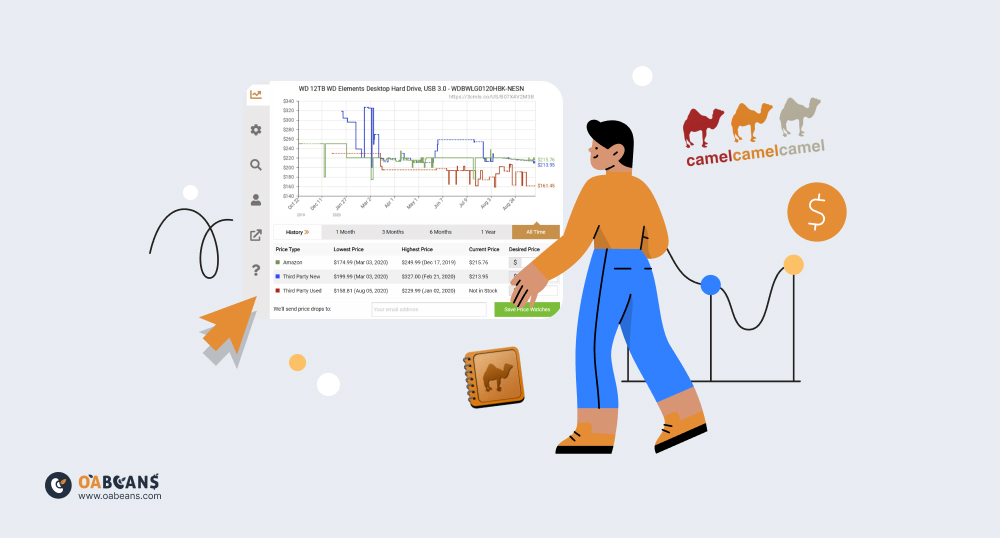
Price Watch Management
The “Your Price Watches” page lists everything you track, with the price when you started, the current price and your target. You can filter, edit or delete watches in bulk.
How to Install the CamelCamelCamel Chrome Extension (Camelizer)
The Camelizer is CamelCamelCamel’s official browser extension. It adds a price history chart and a quick way to create price watches while you browse Amazon.
- Open the Chrome Web Store (or your browser’s add-on store) and search for “The Camelizer”.
- Check that the publisher is camelcamelcamel, then click “Add to Chrome”.
- Pin the extension to your toolbar.
- Open any Amazon product page and click the camel icon to see its price history and set an alert.
The Camelizer works in Chrome, Edge, Firefox, Opera and Safari. There is no official mobile app; on a phone you can use the website or its bookmarklet.
Is CamelCamelCamel Free?
Yes. CamelCamelCamel is free to use, and there is no paid premium plan. You can view charts and even set email alerts without an account, while a free account makes it easier to manage many price watches.
CamelCamelCamel vs Keepa for Amazon Sellers
Both tools track Amazon price history, but they are built for different users. CamelCamelCamel is aimed at shoppers looking for deals; Keepa adds the seller data you need to judge a product’s demand and competition.
| Feature | CamelCamelCamel | Keepa |
|---|---|---|
| Price | Free | Free plan; paid plan for seller data |
| Price history | Amazon, 3rd-party New, 3rd-party Used | Amazon, New, Used, FBA, FBM, Buy Box and more |
| Sales rank history | No | Yes (paid) |
| Buy Box and offer count | No | Yes (paid) |
| Product Finder / sourcing filters | No | Yes (paid) |
| Browser extension | Camelizer | Keepa extension |
| API | No (RSS only) | Yes (separately priced) |
If you source products for online arbitrage, Keepa is the better fit. Learn how to use Keepa for online arbitrage and how to read a Keepa graph, or read our full Keepa review.
Best Free and Paid Alternatives to CamelCamelCamel
- Keepa: the most complete Amazon price and sales rank tracker, with a free plan and a paid plan for sellers. It tracks billions of Amazon products.
- Jungle Scout: a paid product research suite with sales estimates and supplier tools, popular with private label sellers.
- Helium 10: a paid all-in-one suite for product and keyword research, listing optimization and advertising.
- SellerAmp and Seller Assistant: paid tools built for arbitrage sellers that combine profit calculations, restrictions checks and Keepa-style charts.
For a deeper comparison, see our list of the best CamelCamelCamel alternatives.
Complete Your Sourcing With OABeans
Price trackers tell you when a product is cheap, but finding products that are both cheap at a retailer and profitable on Amazon takes much more research. OABeans publishes daily online arbitrage leads lists with the retailer link, buy cost and Amazon data already checked, so you can use CamelCamelCamel or Keepa to confirm a deal instead of hunting for one. If you are new to the topic, start with our guide on checking product price history in online arbitrage.
FAQ
Is CamelCamelCamel legit and safe to use?
Yes. It has been around for many years, it doesn’t need access to your Amazon account, and it earns money through Amazon affiliate links. Install the Camelizer only from your browser’s official extension store.
Is CamelCamelCamel owned by Amazon?
No. It is independently owned and is not affiliated with Amazon.
Does CamelCamelCamel have an app?
No. There is no official mobile app. Use the website, the bookmarklet on mobile, or the Camelizer extension on desktop browsers.
Which Amazon sites does CamelCamelCamel support?
Amazon US, UK, Canada, Germany, France, Italy, Spain and Australia.
Does CamelCamelCamel track third-party sellers?
It tracks the lowest third-party New and Used prices, but not individual sellers, stock levels, Buy Box prices or sales rank.
Why is CamelCamelCamel not showing the latest price?
Prices are refreshed periodically, so a chart can lag behind Amazon by a few hours. Check the “last updated” time on the product page, or compare with Keepa for fresher data.
Final Thoughts
CamelCamelCamel is one of the best free tools for tracking Amazon prices and catching price drops, and the Camelizer makes it easy to use while you browse. For Amazon sellers, it works best as a quick price check. To decide what to buy, you will also need sales rank, Buy Box and competition data from a tool like Keepa, or pre-researched leads.