
What is Amazon PPC?
Quick answer: Amazon PPC (pay-per-click) is Amazon’s advertising system, run through Amazon Ads, where sellers bid on keywords and products so their listings appear in sponsored placements in search results and on product pages. You pay only when a shopper clicks your ad. The most common ad type, Sponsored Products, is open to any Professional seller with an eligible product, while Sponsored Brands and display ads are mainly for brand owners.
Advertisers, from large brands and agencies to third-party sellers, choose the keywords or products they want to target and set a maximum bid for each click. When a shopper searches, Amazon runs an auction that weighs both the bid and how relevant the ad is to that search. Unlike organic rankings, which take time to earn, PPC gives a listing instant visibility, and the extra sales and reviews it brings can also support organic ranking. Used well, Amazon PPC can help you scale your Amazon FBA business.
Types of Amazon PPC Ads
Amazon’s self-service sponsored ads come in three main types:

- Sponsored Product ads
- Sponsored Brands ads
- Display ads (formerly called Sponsored Display)
Sponsored Product ads
Sponsored Products ads promote individual product listings and appear in Amazon search results and on product detail pages. They are the most widely used ad type and usually the best place to start, because they are available to any Professional seller and are shown to shoppers who are already searching for products like yours.
Note for resellers: you don’t need to own the brand to run Sponsored Products, but your ad only shows when your offer is the Featured Offer (the Buy Box). Used, refurbished, and adult products, and products in closed categories, are not eligible.

When choosing an ad, it is essential to choose the targeting type. Sellers can use two targeting strategies types while creating Sponsored Product ads:
1) Manual Targeting
In manual targeting, you can hand-select the keywords or products. The manually targeted ads will appear if a buyer searches the specific keywords or visits certain product pages. Manual targeting is a “hands-on” type: it’s more effective, but you need to keep optimizing it.

2) Automatic Targeting
In automatic strategy, the algorithm of Amazon determines the targeting keywords and products related to your product listing. Amazon uses the clicking data of shoppers and purchases to adjust the ads to suit seller listings and increase conversion. Four different keyword match types are available in automatic targeting:
- Close match: The ads will appear when a customer uses the closely related search terms to your advertised product.
- Substitutes: Here, advertising targets the customers who look for items similar to your products (e.g., Ninja blender instead of Magic blender).
- Complements – the advertising shows the detailed pages of products that complement yours (e.g., walking sticks go with hiking shoes)
- Loose match – when customers search keywords related to your product, these ads appear.
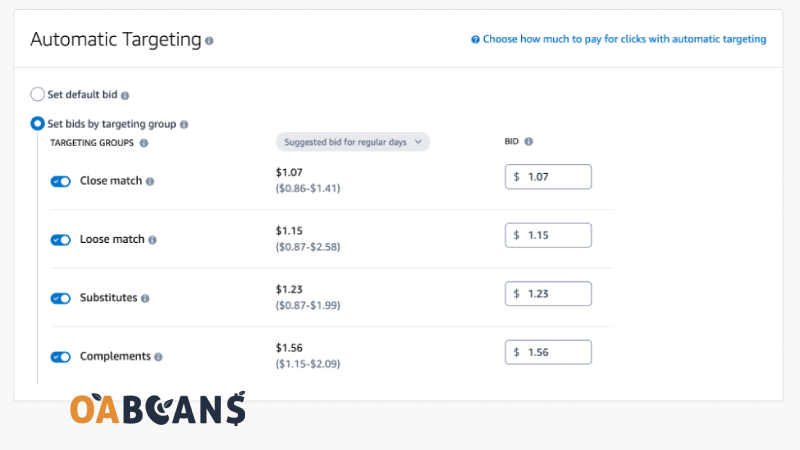
Although automatic targeting is more manageable, it doesn’t have optimization options like other ad types.
Auto campaigns are mainly used as discovery campaigns to find the best performing keywords and products on which you can run manual campaigns.
Sponsored Brands ads

Sponsored Brands ads (formerly “Headline Search Ads”) promote your brand with your logo, a custom headline, and several products or a video. They are available to sellers enrolled in Amazon Brand Registry, so most online arbitrage and wholesale sellers can’t use them on brands they don’t own.
The main Sponsored Brands formats are:
- Product collection: your logo, headline, and several products, linking to your Brand Store or a landing page.
- Store spotlight: highlights different pages of your Amazon Brand Store.
- Video: a short, autoplaying product video shown in search results.
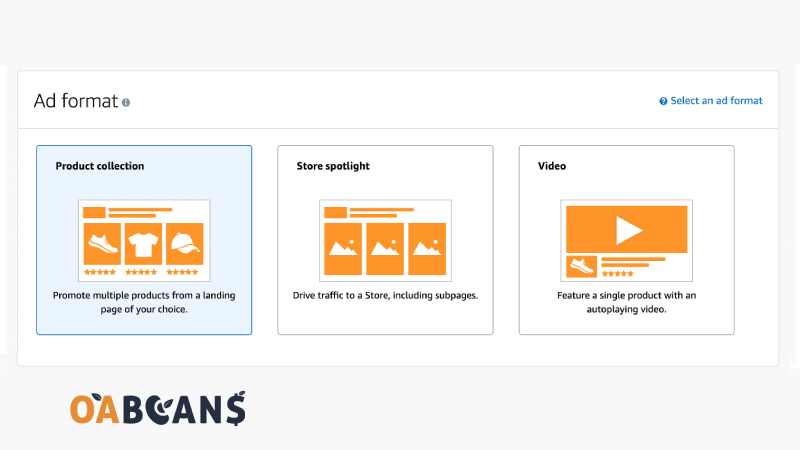
These ads can appear as headline banners at the top of Amazon search results or further down the page as a video. Customers will navigate to product detail pages or a brand’s Amazon Storefront by clicking on each ad.
Display Ads (Formerly Sponsored Display)
Sponsored Display is now part of Amazon’s broader display ads offering, managed under Display, Video, and Audio in the Amazon Ads console. Existing Sponsored Display campaigns keep running. Display ads let you target audiences based on shopping behavior (for example, shoppers who viewed your product or similar products) or target specific products and categories. They can appear on Amazon product pages and search results, as well as on third-party websites and apps. Like Sponsored Brands, they are mainly used by brand owners.

In the example above, a display ad appears on a competitor’s product listing. Amazon also offers newer full-funnel and streaming TV video options, but those are aimed at larger brands with bigger budgets.
How Does Amazon PPC Work?
Amazon PPC is a model of paid advertising. If done correctly, it helps sellers to increase sales of their products. The advertiser pays a fee to Amazon when a buyer clicks on their ad.
Understanding how bidding works is fundamental for our campaigns to work correctly. A bid, or auction, is the amount of money one is willing to pay for a click.
For example, imagine 20 sellers are offering the same product as you. As a new seller, you create an ad to have visibility. Your goal is that if a customer searches for the word “mountain shoes,” your product will appear in an ad.
You must understand that if there are 20 sellers with the same product, they may also be using this strategy. So, whose ad will show up?
A higher bid improves your chances of winning a placement, but the bid is not the only factor. Amazon also considers how relevant your ad is to the search and how likely shoppers are to click and buy, based on your click-through rate (CTR) and conversion history. A relevant ad with strong performance can win placements over a higher bid from a less relevant listing.
You set a maximum cost per click (CPC), and you never pay more than that maximum. In practice you often pay less than your bid, depending on what competing advertisers bid for the same placement. Amazon shows a suggested bid range for each keyword, which is a useful starting point. You can also choose a bidding strategy (dynamic bids down only, up and down, or fixed bids) and adjust bids by placement, such as the top of search results.
Is Amazon PPC Worth It?
For most sellers with their own listings, yes, when it is managed carefully. Amazon PPC puts your products in prominent positions in front of shoppers who are ready to buy, helps new products get their first sales and reviews, and can support organic ranking. But it is not automatically profitable: poorly targeted campaigns can spend your whole margin on clicks that never convert.
PPC is usually worth it when your product has a healthy margin, a strong listing (good images, title, and reviews), and you track results against a target ACoS. For online arbitrage sellers on other brands’ listings, ads are often less important, because you only get impressions while you hold the Buy Box and margins are thinner. In that case, competitive pricing and smart repricing usually matter more than advertising.
Ultimate Guide About Amazon BSR
Key Amazon PPC Metrics: ACoS, TACoS, ROAS, and Conversion Rate
To judge whether your campaigns are working, track these numbers in the Amazon Ads console:
- ACoS (advertising cost of sales): ad spend divided by ad sales. If you spend $20 to generate $100 in ad sales, your ACoS is 20%.
- Break-even ACoS: your profit margin before advertising. If your margin is 25%, any ACoS above 25% loses money on those sales.
- TACoS (total ACoS): ad spend divided by total sales (ads plus organic). A falling TACoS means ads are helping organic sales grow.
- ROAS (return on ad spend): ad sales divided by ad spend, the inverse of ACoS.
- Conversion rate: the share of ad clicks (or page sessions) that turn into orders.
On Amazon, conversion rate measures how many clicks or page views result in a sale. It is essential for several reasons:
- It gives you an overview of the health of your listings.
- It allows your product to be better classified.
- It helps you evaluate the results of your A/B tests on your listing.
- It helps you determine which areas need to be improved.
However, a high conversion rate does not necessarily mean the business is doing well. Remember that having a visitor who bought your product equals a 100% conversion rate. So, it’s still important to look at the actual numbers rather than just the percentage.
Typical online stores convert a low single-digit percentage of visitors, while Amazon conversion rates are often much higher, because many shoppers arrive ready to buy. Rates vary widely by category, price, and listing quality, so compare your campaigns against your own history rather than a single industry average.
How Much Should You Spend on Amazon PPC?
After deciding how to spend your money on Amazon PPC, you need to calculate the required budget for the ads. To do this, first, you need to decide whether you want to advertise all of your products or just a select few of them. Many sellers focus on the top 20% of their products because they don’t want to spend much on advertising.

A common rule of thumb is to keep total ad spend somewhere around 5% to 15% of revenue (your TACoS), spending more during a product launch and less once a product ranks well organically. The better approach is to work back from your margin: calculate your break-even ACoS, set a target ACoS below it, and start with a modest daily budget that you raise only on campaigns that hit that target. Our guide on calculating Amazon profit accurately helps you find your real margin.
How to Setup Your First Amazon PPC Campaign?
Now that you understand how a PPC campaign works, let’s get one up and running.
Interestingly, many marketers recommend starting with two campaigns, which significantly teach you the basics. You can start by creating an automatic PPC campaign and then a manual one. You can do it like this:
- Open Amazon Seller Central.
- Click Advertising.
- Click on Campaign Manager.
- Click on “Create Campaign”.
Carrying Out Your First Automatic Campaign
You may wonder why we’re going straight into an automated campaign, where we have no control over the keywords that Amazon will assign to our products. The answer is simple: Amazon PPC Automated campaigns offer an easy and cost-effective way to discover which keywords perform best for your products.
Remember to keep a modest budget for this campaign and keep checking it out. Over a couple of weeks, you’ll discover a list of high-performing keywords. Write them down and set them aside because we will need them shortly.
Gradually reduce your automated campaign spending as your list of successful keywords grows. You can make this easier by labeling your main keywords as “negative keywords”. Choosing negative keywords will prevent you from spending on them and free them up for your manual campaign, which brings us to:
How to Make a Manual Campaign
Armed with the best-converting search terms from your automatic campaign (find them in the search term report) and keyword research from Amazon’s own suggestions or a tool like Helium 10, you are ready to build your first manual campaign. Our guide to Amazon keyword analysis explains how to find them.
Choose manual targeting when you create the campaign. Then create an ad group, give it a name, select the products you want to advertise, and add your keywords or product targets.
Next, set your bids, the most you are willing to pay per click. Use Amazon’s suggested bid range as a guide and start near the lower-middle of it, then adjust based on results. Competitive categories cost more per click than niche ones, so there is no single “right” starting bid.
Finally, choose match types. For example, if you sell a hiking shoe, you might add “hiking shoes” as a broad or phrase match to keep discovering new searches, and “waterproof hiking shoes for men” as an exact match to control spend on your best converting term.
Remember that running a PPC campaign is more art than science. You’re dealing with customer behavior, which can be pretty challenging to unravel. After two or three weeks, review your campaign, and you’ll have some exciting data to play with.
How to Optimize Amazon PPC Campaigns?
While the example above is a reasonably simple way to get started, the Amazon PPC system can snowball your brand or drain your time and money. So, here are some things to keep in mind:

- Constantly Check Your Keywords
Over time, the analytics reports will give you a detailed history of how each keyword performs, and you’ll soon find that some keywords far outperform others. Take some time weekly to review them, and if you find any low-value keywords, remove them and save your company’s marketing budget simultaneously.
- Choose the Right Keyword Types
Keep a healthy variety of exact match keywords, and extend them with phrase matches and broad matches to reach as many potential customers as possible.
- Avoid the Most Common Mistakes
From not using the available tools to overexerting yourself with PPC expenses, try to be as aware as possible of both your successes and your flaws in a PPC campaign. Bidding against yourself using a keyword in multiple campaigns is an example of a common mistake Amazon sellers make.
- Stay Up to Date
Like any leading eCommerce platform, Amazon’s systems are constantly updated, changed, and enhanced with new features. Stay up to date on the blogs for the latest information, and if there are any significant changes, review your entire campaign set to see if any key (and keyword) changes need to be made.
Know More: Best Product Ideas for Amazon FBA
When Should You Use Amazon PPC?
According to experienced sellers, the right time to launch an advertising campaign is when you create a new listing. Sellers use ads to make the most of the Amazon honeymoon period, ranking the product faster and collecting its first reviews.
In this business, data is essential, and creating a campaign from the beginning will help improve our sales.
Amazon’s PPC allows us to obtain vital information, for example, keywords that we do not have on our list and that we must add, keywords that do not help us sell, and we have to place them as negative keywords, etc.
Reasons to Use Amazon PPC
It would be best if you used Amazon PPC to run your campaigns for two reasons.
The first is that it helps boost the sales of your products, but you have to keep in mind that this is part of a long-term process, and you will not see the results immediately. You should know that it is an excellent alternative to gaining visibility among consumers, which may result in higher sales later.
Pay-per-click campaigns give more visibility to those keywords that you use regularly. With the rise of electronic commerce, there are more and more eCommerce platforms, which means an increase in competition in all aspects. This situation generates a list of too competitive keywords to rank in organic search.
Ultimately, creating PPC campaigns is a required method by which products rank high and gain high sales potential.
Which Factors Affect Your Ad Placement?
If there are multiple relevant products for a given search term, it means that you are competing for placement. 2 critical factors determine the ad placement in such a scenario:

- Bid (CPC): how much you are willing to pay per click compared with other advertisers.
- Relevance and performance: how closely your product matches the search and how likely shoppers are to click and buy, based on your ad’s click-through and conversion history.
Bidding more than other advertisers increases your chances of winning a placement, but relevance matters just as much. A well-optimized listing with strong click-through and conversion rates can win good placements at a lower cost per click. Your ad also needs your offer to be the Featured Offer, so price competitively.
Final Thoughts
Amazon PPC offers sellers an incredible number of opportunities to promote their potential. The various advertising models on Amazon are suitable for both beginners and trading professionals – but always require a strategy to be successful in the end. As with other PPC models, without a strategy, you can quickly burn your advertising budget on Amazon without noticing any significant success.
Amazon’s biggest advantage as an ad platform is purchase intent: shoppers on Amazon are already looking for something to buy. Start small with Sponsored Products, track ACoS against your break-even margin, and scale only what is profitable. If you sell other brands’ products through online arbitrage, focus first on sourcing profitable products and winning the Buy Box; our online arbitrage leads help you find products worth selling, and our guide to Amazon FBA vs. FBM covers fulfillment choices.
FAQ