
Quick answer: To start an Amazon FBA business, (1) choose a business model and the products you want to sell, (2) source inventory you can sell at a profit after Amazon’s fees, (3) create an Amazon seller account (the Professional plan is $39.99/month), (4) prep and ship your inventory to Amazon fulfillment centers with Send to Amazon, and (5) list, price, and grow. Amazon then stores, picks, packs, and ships your orders and handles customer service and returns. This guide walks through each step, what it costs, and what has changed for FBA sellers in 2026.
What is Amazon FBA Business?
Imagine buying products for your inventory, listing them on Amazon, and outsourcing the rest to a professional business that packages, ships, returns, and takes care of the customers. This is Amazon FBA in a nutshell. FBA, or Fulfillment By Amazon, is a service provided by the platform to help sellers outsource the whole process of their order fulfillment to Amazon. You can choose this option on your profile (unlike FBM or Fulfillment By Merchant, which leaves the fulfillment to the seller).
If you choose to go through FBA, you only need to source products, list them, and send them to the nearest Amazon fulfillment center. Every time a customer buys from you, Amazon gets to work. The platform will pick, pack and ship the order to the buyer’s address. After that, if the customer wants to return the product, Amazon will take care of that too. That’s why FBA is such a popular way to start an Amazon business from scratch: you can focus on sourcing and selling while Amazon’s logistics network handles fulfillment.
How Does Amazon FBA Work?
Let’s make it simple. These are the routine steps for Amazon and an FBA business owner:
1. You select and source the products you want to list on your Amazon seller account. This means finding sellers and manufacturers and buying items from them.
2. After making the final purchase, you must send the items to the Amazon fulfillment center. You can either receive the products and send them to the center or leave the job to a freight forwarder.

3. After receiving the products, Amazon holds them in the center until someone orders one. Then the process of delivering will start. This process involves packaging, labeling, and shipping the item to the buyer.
Remember that Amazon will handle possible refunds and returns and handle customer inquiries.
Steps to Launch Your FBA Business
Now that you know what Amazon FBA Business is, it’s time to learn how to enter the field. These are the steps you need to take to start in FBA. Unlike what you might have guessed, it doesn’t begin with creating an Amazon account.
1. Find the products you want to sell
“what should I sell?” is a question you must ask yourself before deciding to start as an FBA seller. It might seem like an easy answer, but it’s not. “just pick whats popular and affordable and list it on Amazon.” Things are a bit more complicated. You should find your own niche and walk in their shoes. What products are going to be in demand in the next two years? What about the next ten years? Are trends shifting towards minimalism? Are people suddenly excited about living with zero waste? Finding the right products doesn’t take a business genius; it just takes time and research. Remember that whatever you sell should also be interesting to you.
2. Source the products.
Now that you have finalized the categories, it’s time to go after them. There are a lot of approaches to Amazon sourcing; you can buy online or from chain stores, find interesting local markets, handpick the items from a garage sale, or use online tools and websites. In the first months, try to find products that can be sold year-round and aren’t affected seasonally, and make sure to read their comments and reviews. You don’t want to sell a table that is too hard to assemble or a flower pot many buyers believe smells!
3. Select a business model.
There are a few ways you can sell your products on Amazon.
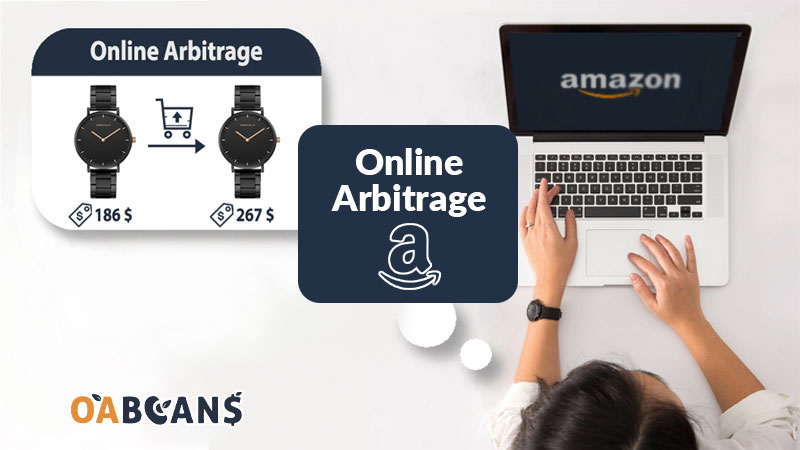
– Online and retail arbitrage: in these models, you will buy a product that is on sale or discounted for a lower price and then list it on Amazon for a higher one. Online arbitrage means buying from an online source, and retail arbitrage can include sourcing from physical shops.
– Wholesale: this is when you buy in bulk from suppliers and then list them on Amazon for a profit. You must ensure the purchase is large in wholesale since some suppliers require a minimum order.
– Private label: selling private label means buying items from a source or a manufacturer and branding them as your own. For example, you can buy hand creams from Alibaba or DHGate and then put your own logo and label on them. Customers will know the cream by your name.
4. Create your seller’s account.
Now you can sign up in Seller Central and officially become a seller. You’ll need a government-issued ID, a bank account, a chargeable credit card, a phone number, and your tax information, and Amazon will verify your identity before you can sell. There are two selling plans: the Individual plan has no monthly subscription but charges $0.99 per item sold and is designed for sellers moving fewer than 40 units a month, while the Professional plan costs $39.99 per month with no per-item fee and adds bulk listing tools, advertising, business reports, and eligibility for top placement on product detail pages (the Buy Box). Referral fees and FBA fees apply on both plans, so most serious FBA sellers start on, or quickly move to, the Professional plan. See our full breakdown of Amazon FBA fees and costs, and if you’re unsure about business structure, read whether you need an LLC to sell on Amazon.

5. Ship your products to Amazon centers.
You have to get your inventory into Amazon’s network to start the FBA process. Create your shipment in Seller Central with Send to Amazon, prep and label each unit according to Amazon’s FBA packaging requirements, and ship the boxes with an Amazon partnered carrier or your own. Amazon may split a shipment across several fulfillment centers; choosing fewer inbound locations usually adds an inbound placement service fee, so compare the options before you confirm. If you import from overseas, you’ll also choose between air and sea freight, and many sellers pay a third-party inspection company to quality-check goods before they leave the factory. Online and retail arbitrage sellers often use a prep center to receive, prep, and forward inventory to Amazon for them.
6. List the items and start selling.
All done. Now you can launch the products by listing them on your Amazon profile. Amazon FBA Business starts when you go to your seller central and make a listing. Remember that although Amazon takes the load off your shoulders by fulfilling the orders, you must set up an optimized and attractive product page. Optimize your listings, include eye-catching pictures and good videos and encourage customers to leave reviews for you. After a while, you can start marketing for your business using Amazon ads, different marketing tools, and even influencers.
Read More Details About Amazon FBA Costs
What Should You Sell on Amazon in 2026?
Remember the tip about finding your own niche? Part of succeeding is looking beyond today and spotting what’s about to trend in the coming months. Categories such as beauty and personal care, home and kitchen, toys and games, health and household, and sports and outdoors are consistently among Amazon’s most popular, but popular categories also bring more competition, and some products and brands are gated. Start with Amazon’s Best Sellers and Movers & Shakers lists, check each product’s sales rank history and the number of competing FBA offers, and confirm you’re allowed to sell it before you buy. Social media trends matter too: when a beauty product goes viral, demand can jump overnight. Our guides to the top Amazon product categories and the best-selling products on Amazon go deeper.
Also, dig into Amazon’s best sellers lists and find products close to your interests. If you are new to Amazon FBA business and don’t have the time or knowledge to go on a product sourcing journey, a sourcing list can shortcut the process. OABeans provides ready-to-use online arbitrage leads for Amazon US and Canada sellers: products handpicked from retail websites and online stores and quality-checked by our team, which you can review and buy by simply clicking the link. Compare the subscription plans on our pricing page. As with any lead, double-check the price, your selling eligibility, and the fees before you buy.
Read More: How to Find Prep Centers for Amazon FBA?
What’s Changed for Amazon FBA Sellers in 2026?
Amazon adjusts FBA fees and programs every year, so build current numbers into your plan:
- 2026 fee update: After no increase to US referral or FBA fees in 2025, Amazon raised FBA fulfillment fees by an average of $0.08 per unit sold effective January 15, 2026, with more granular pricing (lower fees where Amazon’s costs are lower, higher fees for enhanced services). No new FBA fee types were added for 2026.
- Inbound placement and low-inventory fees: Since 2024, Amazon has charged an inbound placement service fee when you choose fewer inbound locations, and a low-inventory-level fee on standard-size items that are consistently understocked relative to demand. Plan shipments and restocks with both in mind.
- Storage limits: How much you can store is tied to your account’s inventory performance. Learn how it works in our guide to Amazon FBA inventory storage limits.
- FBA New Selection program: For eligible branded ASINs launched between July 30 and October 31, 2026, benefits include free storage, returns, and liquidations on the first 200 units for 120 days, referral fees capped at 10% on the first 100 units and 5% on the next 100 (or your normal rate if lower), plus coupon and Vine fee credits. An IPI score of 300 or higher (or no score yet) is required, and the benefits don’t stack with New Seller Incentives. Check Seller Central for the current terms.
- New tools: Amazon updated its Revenue Calculator and Fee and Economics Preview report with 2026 rates and added a Profit Analytics dashboard that shows per-product unit economics.
How to Source Products to Sell on Amazon?

Here are some ways to source products for selling on Amazon:
- Shopping manually is the easiest, most approachable sourcing method for some people. You get a close touch of what you will purchase by going to stores or browsing websites.
- Software: free and paid software gives you sourcing lists. This method is quick and relatively cheap since most software crawls websites and provides general lists. But this has a downside; you might need to alter the list yourself.
- Websites: sourcing websites are also a good option. Before subscribing to one, make sure the site has your data, interests, and desired categories. Otherwise, you might end up with a useless list.

Best Strategies to Grow Your FBA Business
Amazon FBA Business, like any other business, needs planning and learning. Here are some pro tips to consider while deciding:
- Start small: you don’t have to buy 500 face masks to enter the field of FBA. Start with smaller numbers because the first weeks and months probably will bring about disappointments. You don’t know how to market, you are new to selling, and some items might stay in your inventory. This is totally natural, so don’t stock up heavily on a single product. Give yourself time to breathe and learn.
- Use tools wisely: tools are there to help you, but sometimes they can become nightmares. To avoid being surrounded by tools and software, you don’t know how to use and paying for useless subscriptions, read about each one. Before subscribing to a sourcing tool, a marketing system or accounting software, read what people have said about it and watch tutorial videos. Save time for learning how to sell.
- Update yourself on Amazon rules and regulations: neglecting the rules of a marketplace can get you suspended or even banned, so make sure you read every email and pay attention to each update. Know what products are restricted and which categories need approval.
- Increase multichannel sales: Don’t put all of your eggs in one basket. Especially if you are experiencing a new method, try other channels like Instagram campaigns and owned websites, etc.
- Manage returns efficiently: This can be a pain point for many sellers, thus putting you in a better place among competitors if you consider it. study the best return methods, do surveys and find a unique way that makes your customers happy.
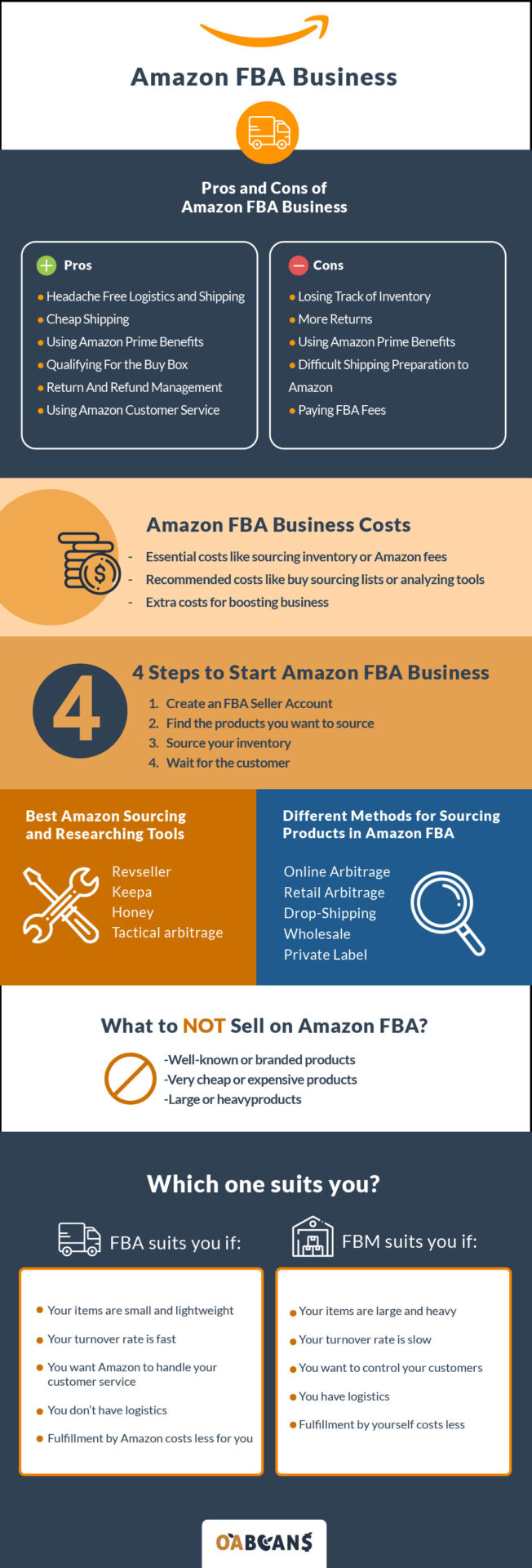
Pros and Cons of Amazon FBA
Before you commit, weigh what FBA does well against what it costs you in fees and control.
Pros
- Hands-off logistics: no printing labels, buying boxes, or daily trips to the post office. Amazon picks, packs, and ships every order.
- Competitive shipping costs: Amazon’s fulfillment network often ships for less than you could on your own, especially for small, light items.
- Automatic Prime eligibility: FBA offers carry the Prime badge, which Prime members trust and filter for.
- Stronger Buy Box competitiveness: fast, reliable fulfillment helps your offer compete for the Buy Box.
- Returns and customer service handled for you: Amazon manages buyer questions, returns, and refunds around the clock.
- Easy to scale: you can grow sales without renting a warehouse or hiring a shipping team.
Cons
- Fees add up: fulfillment fees, monthly storage (higher from October to December), the aged inventory surcharge on slow sellers, and inbound placement fees all cut into margins.
- Inventory management: storage limits and slow-moving stock need constant attention, and it is easy to lose track of what you have across fulfillment centers.
- More returns: Amazon’s easy return process can lead to more returns, and some come back unsellable.
- Strict prep and labeling rules: every unit must be prepped and labeled to Amazon’s requirements. Many sellers pay a prep center to handle this.
- Less control: you don’t control packaging, inserts, or the customer relationship.
Useful Amazon FBA Sourcing and Research Tools
Each tool focuses on a different job, so most sellers combine a few:
- Amazon Revenue Calculator: Amazon’s free calculator estimates fees and net profit per unit before you buy.
- Keepa: price and sales rank history charts that show whether a product sells consistently and at what price.
- SellerAmp SAS: a browser extension and app that calculates profit and ROI and flags selling restrictions and other risks on a listing.
- Tactical Arbitrage: scans retailer websites and matches products to Amazon listings at scale. Always double-check matches manually.
- Sourcing lists: ready-made online arbitrage leads save the research time entirely, which suits beginners and busy sellers alike.
For more options, see our list of useful Chrome extensions for online arbitrage.
What Are the Differences Between Amazon FBA & Other Business Models?
Most Amazon business owners use FBA, but some prefer Fulfillment by Merchant (FBM), where the seller stores inventory and ships orders. With FBA, Amazon takes responsibility for everything after your inventory arrives and charges a per-unit fulfillment fee plus monthly storage fees. With FBM you avoid FBA fees, but you pay for your own storage, packaging, shipping, and customer service, and you must meet Amazon’s shipping performance standards.
One of the biggest differences is that FBA offers are automatically eligible for Prime, so Prime members get fast shipping at no extra cost to them, which usually helps conversion and your chances of winning the Buy Box. FBM sellers can only offer Prime through Seller Fulfilled Prime, which has strict performance requirements.
Many sellers use both models: FBA for fast-moving, standard-size items and FBM for slow movers, oversized products, or items with thin margins. The right mix depends on your products, your margins, and how much of the operation you want to handle yourself. Our Amazon FBA vs. FBM comparison walks through the decision in detail.
FBA vs. dropshipping: with FBA you buy and own inventory before you sell it, which means more upfront risk but full control over stock and delivery speed. With dropshipping you sell first and buy afterward, so you need less capital, but Amazon’s dropshipping policy requires you to be the seller of record and prohibits buying from another online retailer and having it ship directly to your customer. Amazon vs. your own store: Amazon brings the customers and the trust, while a store built on a platform like Shopify gives you more control but makes you responsible for all of the marketing.
How Much Does It Cost to Start an Amazon FBA Business?
There’s no fixed number, but your startup budget usually needs to cover the Professional selling plan ($39.99/month), your first inventory purchase, referral fees (a percentage of each sale, 15% in many categories), FBA fulfillment and storage fees, shipping to Amazon, prep and labeling supplies or a prep center, and any software you use for sourcing, repricing, or profit tracking. Online arbitrage lets many sellers start with a smaller inventory budget than private label, because you buy existing branded products in small quantities instead of paying for a manufacturing run. Before you buy anything, run the numbers in Amazon’s Revenue Calculator. If you’re still weighing whether it’s worth it, read is Amazon FBA still profitable.
Final Thoughts
No matter how hard you read articles and watch YouTube videos, you won’t know the real deal before you start your FBA business. Remember that it’s natural to face bumps along the way or even feel frustrated sometimes, but doing business on online marketplaces is not impossible. Update yourself regularly and read every helpful tip and review, even if it’s an Instagram post about FBA mistakes. Get your skin in the game, sell what you need to sell, and Amazon will help you move forward.

28 replies on “How to Start an Amazon FBA Business in 2026: Step-by-Step Guide”
What a good article 👏
Thanks for your comment
For newbies I recommend FBA. Because you may get into trouble in first days of your activity in FBM.
Hi John.
Thanks for your comment for us ✋
Thanks for sharing this article
Thanks for your comment sir 🖐
This was the most complete article I read about Amazon FBA. Thanks to the oabeans team
Hi Schorle. Thanks for your comment to us 🙏
I learned important information about Amazon FBA. thank you
Thanks for your comment Ali.
This article helped me a lot to start Amazon FBA. Thank you. If I want to know more about Amazon, can you tell me a source?
Hi Alex. If you wanna learn more about Amazon FBA & Online Arbitrage, please follow the link below.
https://oabeans.com/blog/
Really useful article
Thanks dear Stephan 🌹
Thanks alot. I’ve read whole of the article. please publish more articles in amazon fba business category
Hi Jones. Thank you for your consideration 🙌
Hi. What is FBA stand for?
Hi sir. Fulfillment by Amazon
This article helped me out to start my amazon business successfully thanks to your page
Greatly appreciate your comment Daan
Interesting information over here.
Totally agree with you, Anybody enrolled in Amazon FBA can allow Amazon to deal with all transportation, including returns and discounts, just as item warehousing in Amazon’s stockrooms, picking and and packing, and more.
Thank you for your consideration
Really great article about amazon fba 2022
Hello We’re so pleased to hear from you Selina.
I found this article really useful, thanks oabeans.
Really appreciate it Emila.
Thanks for sharing the meaningful post!