
Seller Assistant App review in short: Seller Assistant App is an all-in-one Chrome extension and web platform for Amazon resellers. It shows profit, ROI, fees, restrictions, IP complaint alerts, stock levels and Keepa charts right on Amazon product pages, and adds bulk tools such as a Price List Analyzer and Bulk Restriction Checker for wholesale and online arbitrage sourcing. Plans start at $24.99 per month billed yearly, and the Business plan comes with a 14-day free trial.
This review covers what it does in 2026, what it costs, how the free trial works, and how it compares with other Amazon seller Chrome extensions, so you can decide if it fits your business.
What Is Seller Assistant App?

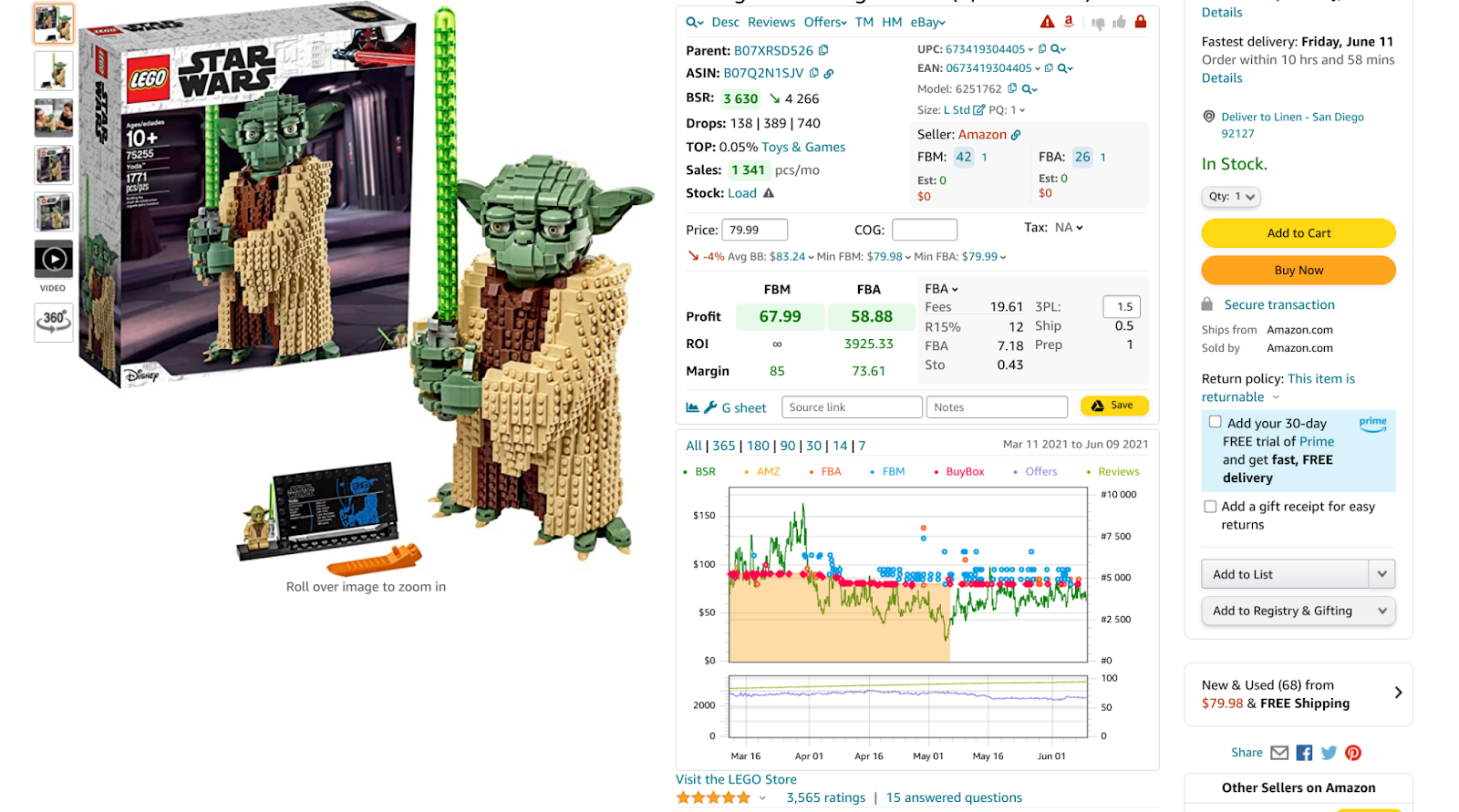
Seller Assistant App is a popular Chrome Extension used by Amazon sellers for product analytics. This advanced online arbitrage tool combines an Amazon FBA calculator, IP alerts, Quick View, a Stock Checker and a restrictions checker. It is developed by Linen Art LLC and is available for Chrome, Microsoft Edge and Firefox. Such a combo equips sellers with powerful data-driven product insights and gives merchants the advantage to discover truly profitable goods to resell.
Furthermore, the Seller Assistant App integrates right into the Amazon product page and shows all product information with no extra clicks or scrolls. Now all needed information is in one place. In addition, sellers can export analyzed data to Google Sheets in just one click. It helps to speed up product search routine and save precious time while finding more profitable products.
With Seller Assistant App, you can calculate ROI and Profit Margin, see Amazon Referral and FBA fees, analyze current and historical data, estimate sales and profit, spy on your competitors, add product notes, and save the result to Google Sheets. It makes both arbitrage and wholesale sourcing much easier, and its web tools add bulk analysis for supplier price lists, which is why many wholesale sellers use it as their main sourcing tool.
Seller Assistant App Features
Seller Assistant App is a powerful product research tool with a rich set of features. Here are the most crucial of them:
On-Page FBA & FBM Calculator
Quick access to the FBA & FBM calculator is essential for Amazon sellers. The majority of plugins are only available through clicking on the plugin icon, which is not handy.
Seller Assistant App shows up right on Amazon product pages. No extra clicks are needed!
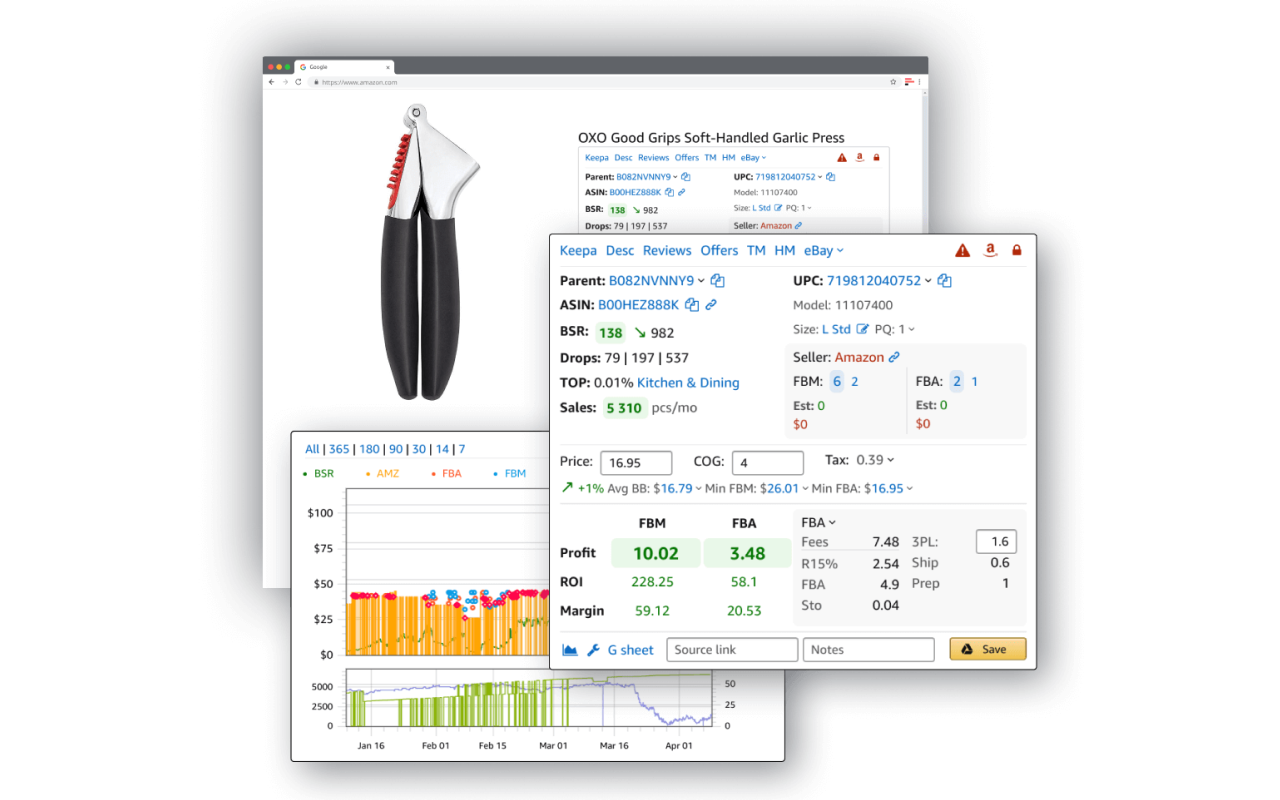
The Extension calculates ROI and Profit Margin, taking into account Cost of Goods, Sales Taxes on Cost of Goods, Amazon Referral fee, FBA fee, VAT, Monthly Storage Cost, and 3d Party Logistics Cost.
Sales and Profit Estimation
Product analysis includes a profit estimation and inventory planning for further purchasing.
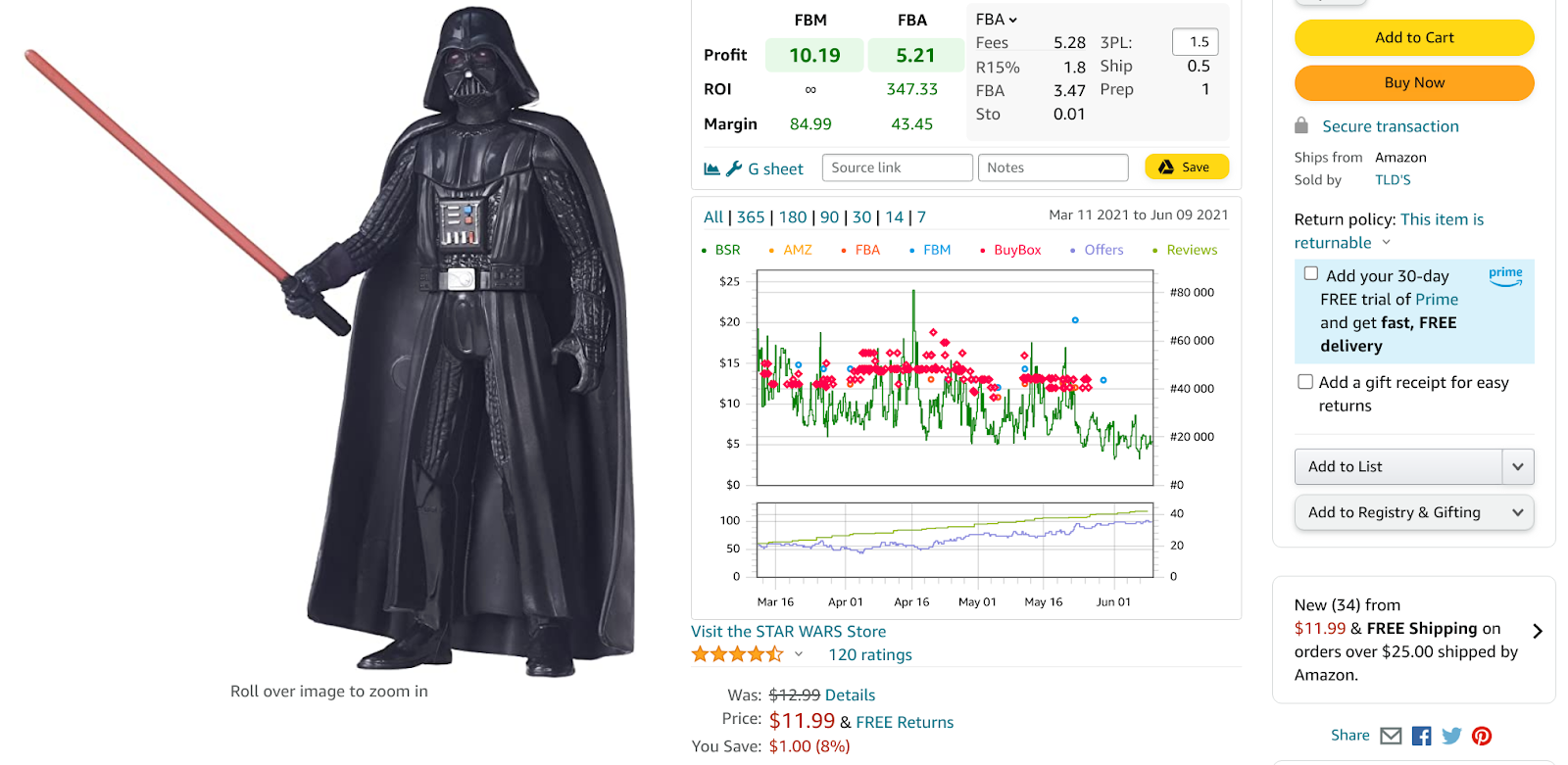
Seller Assistant App estimates sales velocity and calculates the potential profit considering the number of competitors, their type, and price. As a result, Amazon sellers get not only a profit calculator but a monthly profit and sales estimation for their share of the Buy Box.
Keepa Graph and Historical Data
This feature shows the current and historical product-related data, including BSR Drop, which means the product has been sold. It helps better understand price and sales dynamics and the level of competition. Thus, more accurately evaluates the potential number of sales the selected product has, highlighting the pitfalls to be avoided.
Data Export to Google Sheets
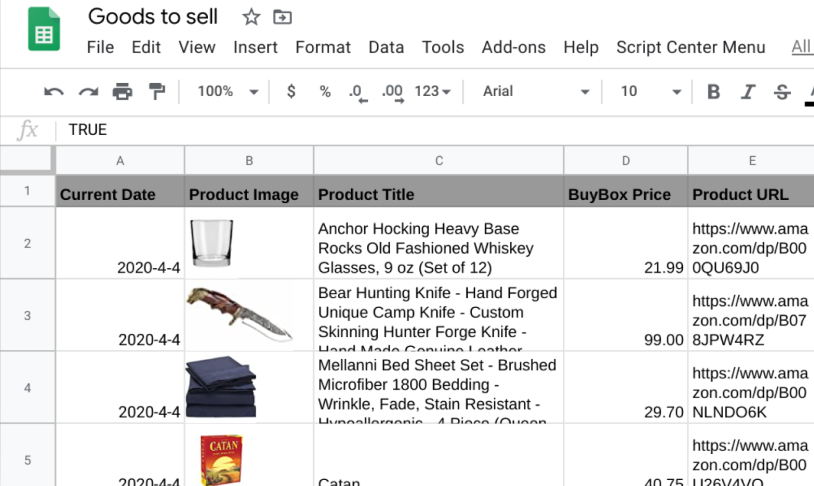
To stay organized, Amazon Sellers must save founded deals for future use. This daily routine kills a lot of time and causes a lot of pain.
Seller Assistant App has solved this issue. Now, sellers can export analyzed data to Google Sheets in just one click. Stay focused on the product analyzing process and forget about copy-paste. Dozens of product data points are available for export, and you can add notes and tags to each product before you save it.
Read More: How to Export Amazon Data to Google Sheets?
Stock Checker
Amazon is a highly competitive marketplace and to succeed you need to keep an eye on your competitors. It’s important to know their remaining goods and how this data changes to plan your inventory replenishment and turnover.
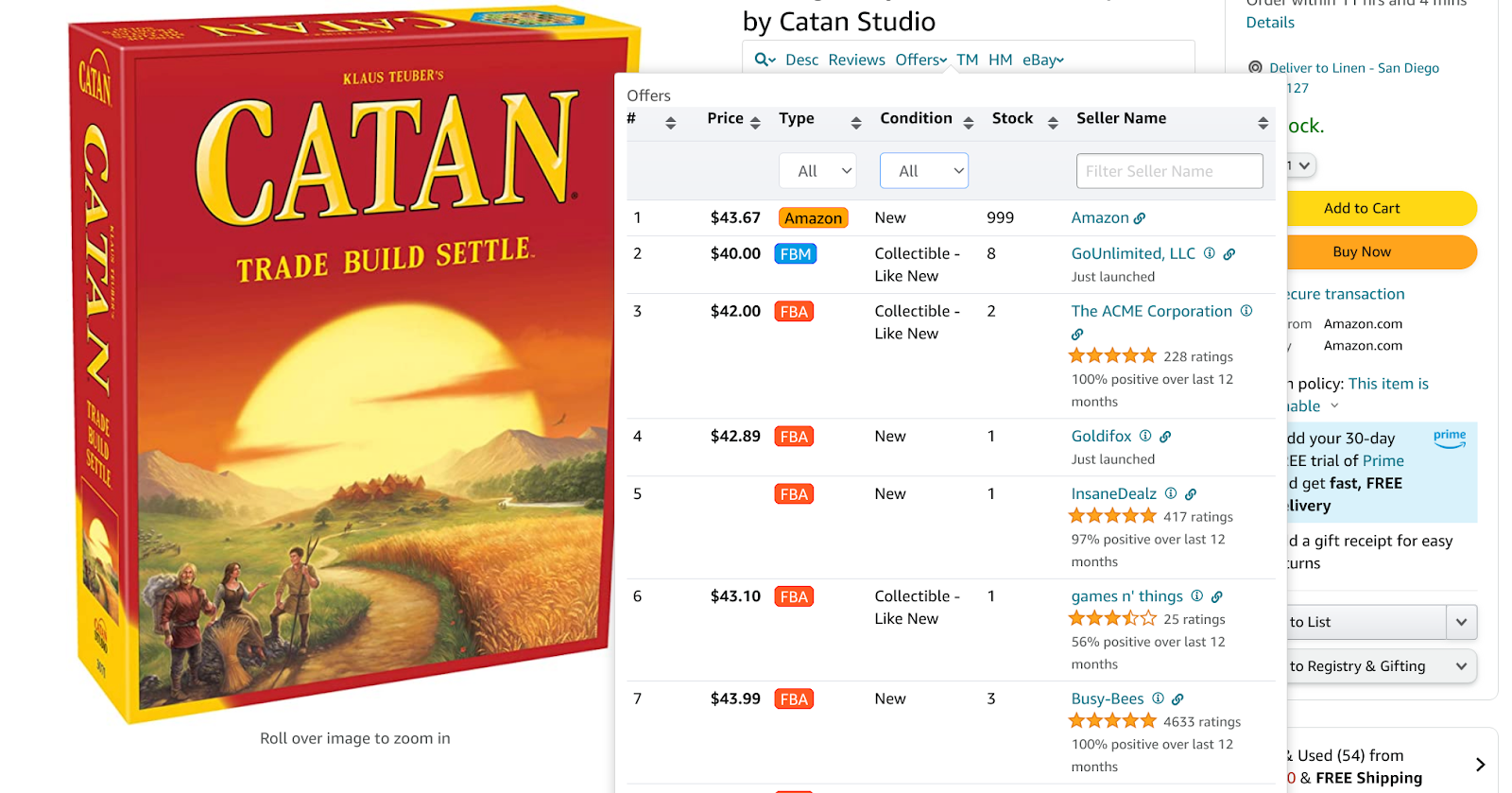
With Stock Checker, sellers can see how many products are left in their competitors’ stocks.
Seller Assistant App shows all sellers’ remaining goods and the total quantity of goods.
Read More: How to know the Competitors product stock?
Product Restrictions and Alerts
Each product’s parameters vary from one to another, and knowing them is crucial. For example, glass products require additional protective packaging, and oversize and hazmat items follow separate FBA rules and fees.
Why is knowing them important? It helps estimate your expenses more accurately and avoid unexpected charges due to product restrictions.
Seller Assistant App shows whether you are restricted from selling a product (brand or category gating) and flags characteristics like hazmat, meltable, fragile, adult, oversize and multipack (set quantity) items. If a product is gated, our free Amazon ungating course for OABeans members explains how to apply for approval.
IP Alert
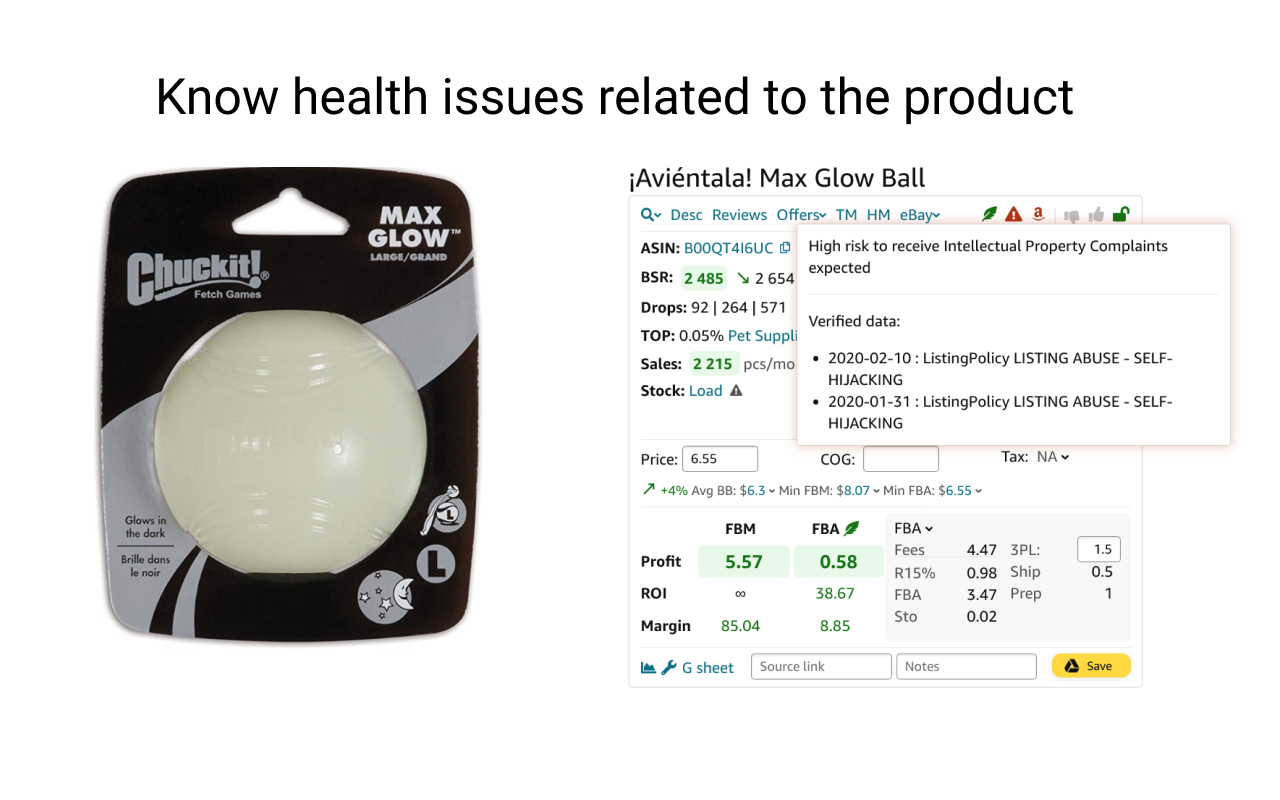
You sell other brands’ products when you do online arbitrage or wholesale. Some brands file intellectual property complaints aggressively to protect themselves, and these complaints can lead to listing removals or even account suspension. Our guide to IP complaints on Amazon explains the risk in more detail.
Seller Assistant App has developed a unique IP Alert system based on a database of past infringement claims. Complaints are automatically collected daily and show if intellectual property complaints are likely. You will always know the type of complaint and the date it was received. It’s safer to trade with the Seller Assistant App!
Product Quick View on the Search Page
Sellers often look for products through Amazon search results. In this case, it’s important to see product data without opening every listing.
The Extension shows ASIN, BSR, and Category, whether Amazon is among sellers, and the number of FBA & FBM sellers on the search page.
Work without Amazon Seller Account Integration
Some people do product research for outsourcing while they have no Professional Amazon Seller Account. In this case, they need software that does not require Amazon Seller Account integration.
With Seller Assistant App, you can do product research without connecting an Amazon seller account. Connecting a Professional seller account adds restriction (brand gate) checks, the Bulk Restriction Checker and restriction data in the Price List Analyzer, and makes fees and offer data come directly from Amazon, with fewer loading errors.
Supported Amazon Marketplaces
If you sell on several marketplaces, it is important to have a single toolbox. Seller Assistant App supports 21 Amazon marketplaces: the US, Canada, Mexico, Brazil, the UK, Germany, France, Spain, Italy, the Netherlands, Ireland, Poland, Sweden, Turkey, India, the UAE, Saudi Arabia, Egypt, Japan, Australia and Singapore. You can connect one seller account per region (North America, Europe and Far East).
Side Panel on Supplier Websites
When you browse a retailer or supplier site, the Side Panel shows the matching Amazon product with its profit, ROI, sales rank and restrictions, so you can check a deal without switching tabs. A Storefront Widget does the same on Amazon seller storefronts, which is useful for storefront stalking.
Price List Analyzer and Bulk Restriction Checker
For wholesale sellers, the Price List Analyzer uploads a supplier price list, matches each item to Amazon by UPC, EAN or title (with AI matching for harder cases) and calculates profit for the whole file. The Bulk Restriction Checker tells you which ASINs you can sell before you contact a supplier.
Seller Spy, Brand Analyzer and Team Tools
Seller Spy and Brand Analyzer help you research competing sellers and brands. Sub-accounts let virtual assistants source under your account, and newer operations tools such as purchase orders, a repricer, a lister and prep center integrations turn Seller Assistant into more of a full workflow platform for wholesale teams.

Seller Assistant App Pricing
Seller Assistant App changed its plans in 2026. These are the current prices on its pricing page:
- Pro: $29.99 per month, or $24.99 per month billed yearly ($299.99 per year). Includes 2 seats and 3 extension installs. Best for solo resellers.
- Business: $79.99 per month, or $69.99 per month billed yearly. Built for teams and wholesale sellers working with several brands.
- Business Plus: $189.99 per month, or $159.99 per month billed yearly, with 5 seats and higher limits on most tools.
- Agency: from $999.99 per month on an annual contract, for large teams.
- Extra users: $14.99 per month, or $12.99 per month billed yearly.
Self-serve plans have no contract and can be cancelled at any time, but payments are not refunded, so use the trial first. Yearly billing saves up to about 20%.
Does Seller Assistant App Have a Free Trial?
Yes. The Business plan includes a 14-day free trial. During the trial each tool has a usage allowance and exports are limited to the first 25 rows. The Pro plan starts as a paid subscription. Seller Assistant also offers free web tools, such as an FBA calculator, ASIN lookup and UPC-to-ASIN converter, that you can use without a subscription.
How Accurate Are the Fee Estimates?
Seller Assistant App uses Amazon marketplace data for fees when it is available and falls back to Amazon’s published fee rate cards. Connecting your Professional seller account gives the most reliable figures, because fees and offers then come directly from Amazon. The calculator includes referral fees, FBA fulfillment fees (including the holiday peak surcharge), storage, inbound placement, closing fees, the Digital Services Fee, VAT on fees and your own prep or 3PL costs. Keepa provides historical data and averages.
Two things can still make its numbers differ from Seller Central: inbound placement is shown at the maximum rate (a conservative estimate), and wrong product dimensions, weight or category on the listing will change the real fees. For an independent check, compare a few products with our free FBA calculator.
How to Download and Install the Seller Assistant App Chrome Extension
- Open the Seller Assistant extension page in the Chrome Web Store (it is also available for Microsoft Edge and Firefox).
- Click Add to Chrome and pin the extension to your toolbar.
- Create your Seller Assistant account and start the free trial or choose a plan.
- Optionally connect your Amazon Professional seller account to unlock restriction checks and Amazon-sourced fee data.
- Open any Amazon product page: the Seller Assistant panel appears on the page with profit, ROI, fees and alerts.
At the time of writing, the Chrome Web Store listing has a 4.5 out of 5 rating from about 270 reviews and tens of thousands of users.
Seller Assistant App Pros and Cons
Pros:
- Shows profit, ROI, fees, restrictions, IP alerts and stock levels on the Amazon page without extra clicks.
- Side Panel on supplier sites and a strong Price List Analyzer for wholesale sourcing.
- Supports 21 Amazon marketplaces and works in Chrome, Edge and Firefox.
- Team features and VA sub-accounts for growing businesses.
Cons:
- More expensive than simple extensions such as RevSeller, especially for team plans.
- No mobile scanning app for in-store retail arbitrage.
- The free trial is tied to the Business plan and has usage limits.
- Restriction checks and the most reliable fee data need a connected Professional seller account.
Seller Assistant App Alternatives
- SellerAmp SAS: its closest rival, with a mobile app for barcode scanning and an advanced search. See our SellerAmp review.
- Keepa: the price and sales rank history database many sellers pair with Seller Assistant.
- RevSeller: a lighter, cheaper profit and restriction panel on Amazon pages. See our RevSeller review.
- AZInsight: another on-page profit calculator with fewer bulk and team tools.
For a wider comparison, see our list of the best Amazon seller Chrome extensions.
Seller Assistant App FAQ
Is Seller Assistant App free?
Not fully. Paid plans start at $24.99 per month billed yearly, the Business plan has a 14-day free trial, and some web tools such as the FBA calculator and ASIN lookup are free to use.
Is Seller Assistant App worth it?
For online arbitrage and wholesale sellers who check many products a day, the time saved by having profit, restrictions and IP alerts on one screen usually justifies the price. If you only check a few products a week, a cheaper extension may be enough.
Do I need an Amazon seller account to use Seller Assistant App?
No. You can research products without one, which is useful for VAs. Connecting a Professional seller account adds restriction checks and more accurate Amazon fee and offer data.
Which browsers does Seller Assistant App support?
Seller Assistant App works in Google Chrome, Microsoft Edge and Mozilla Firefox.
Final Thoughts
Seller Assistant App is more than just a popular FBA calculator. It’s a reliable Product Research tool for a new generation. The Extension offers an impressive list of useful and handy features. It allows Amazon sellers to make better product analytics and sales estimations. Seller Assistant App is useful for FBA beginners and experienced resellers alike, and its wholesale tools make it especially strong for sellers who analyze supplier price lists. In general, we recommend trying the Seller Assistant App free trial before you pay. If you would rather start with researched deals than search for them yourself, our online arbitrage leads give you researched products to check and buy.
Ready to try it? Sign up for Seller Assistant App with the OABeans link and start with the free trial.