
Amazon Seller Account Suspended: What Does it Mean?
If your Amazon seller account is suspended, Amazon has removed your selling privileges: your listings stop showing, you cannot sell, and Amazon may hold your funds. Today Amazon usually calls this a deactivated account, and the notice often says your “selling privileges have been removed”. In most cases you can get the account back by submitting an appeal with a clear Plan of Action through the Account Health dashboard in Seller Central.
The key is to act quickly and thoroughly. Read the notice carefully, fix the root cause, and appeal once with a complete, specific plan. Below we cover what happens, the most common reasons, the appeal process step by step, and how to avoid suspension in the first place.
What Happens When an Amazon Seller Account Is Suspended?
- Selling stops: your listings are removed from the store and you cannot create new offers.
- Funds may be held: Amazon can hold disbursements while the issue is reviewed.
- You get a notification: Amazon emails you and posts the notice in Seller Central (Performance > Account Health). It explains the reason and how to appeal.
- You appeal: you identify the issue and submit a Plan of Action (POA) and any requested documents.
- Amazon decides: if the appeal is accepted, your account is reinstated and selling resumes. If you do not respond, or the appeal fails, the deactivation can become permanent.
What does “your selling privileges have been removed” mean?
It means your account has been deactivated and you cannot sell until Amazon reinstates it. The message is not always permanent: unless Amazon says the decision is final, you can usually appeal from the Account Health page. For the differences between each status, see our guide on Amazon account deactivated vs suspended.
Why Is My Amazon Seller Account Suspended?
These are the most common reasons for an Amazon seller account suspension:
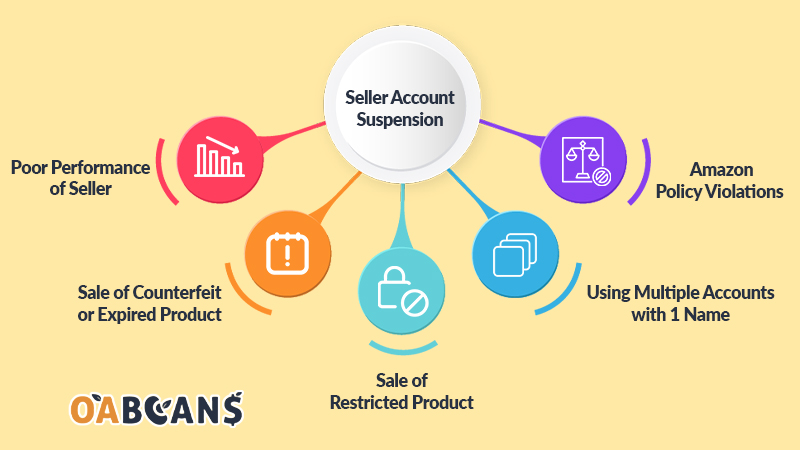
Poor Performance (Metrics)
Missing Amazon’s performance targets is one of the most common causes. The main targets are an Order Defect Rate below 1%, a Pre-fulfillment Cancel Rate below 2.5%, a Late Shipment Rate below 4% and, for seller-fulfilled orders, a Valid Tracking Rate above 95%. Amazon also summarizes your compliance in an Account Health Rating (AHR). Learn how to track these in our Amazon account health guide.
Policy Violations
Amazon is strict about its policies. Selling prohibited or restricted products, breaking listing rules, or violating the Seller Code of Conduct can trigger a suspension.
Intellectual Property Complaints
Trademark, copyright or patent complaints from rights owners, or listing products that infringe someone else’s IP, can lead to listing removals and account deactivation. Read our guide on how to handle an IP complaint on Amazon.
Product Authenticity Complaints
“Inauthentic” or “counterfeit” complaints are especially risky for arbitrage sellers. Amazon may ask for invoices from your supplier, and retail receipts are not always accepted. Buying from reputable retailers, keeping every invoice, and avoiding brands that are known to file complaints all reduce the risk.
Related Accounts and Multiple Accounts
Amazon may deactivate an account it believes is related to another deactivated account, or if you run more than one account without a legitimate business need. Amazon generally allows one Seller Central account per region unless you have a legitimate business reason for a second account.
Review Manipulation
Manipulating product reviews is not tolerated. Paying or incentivizing reviews, reviewing your own products or using fake accounts is prohibited and can lead to suspension.
Fraud and Identity Verification Issues
Suspected fraud, fake transactions, listing hijacking or failing identity verification will lead to deactivation.
Inaccurate Product Information
Misleading titles, descriptions or images lead to “not as described” complaints, returns and, eventually, account health problems.
Late Responses to Amazon Requests
Not answering Amazon’s requests for information or documents on time can result in deactivation, so check Seller Central notifications and your email regularly.
Account Suspension vs Listing (ASIN) Suspension
Not every suspension affects the whole account. Amazon can also deactivate or suppress a single listing (ASIN) because of a safety complaint, a missing document, a pricing issue or a listing policy problem. A listing suspension removes only that product from sale; you usually fix it from the listing’s page in Seller Central or Account Health. Repeated listing issues, however, can add up and put the whole account at risk.
Typical Amazon Appeal Process
A suspension notice is stressful, but many accounts are reinstated with a well-written appeal. Follow these steps:
1. Read the notice carefully
Find the exact reason, the policy involved and the listings or orders affected. Your appeal must address exactly what Amazon flagged.
2. Review your Account Health dashboard
Go to Performance > Account Health in Seller Central. Check your metrics, policy violations and any complaints, and gather the data that explains what went wrong.
3. Read the relevant Amazon policies
Re-read the policies tied to your violation and reference them in your appeal. This shows Amazon you understand the rules and will follow them.
4. Write a Plan of Action
A strong Plan of Action has three parts:
- Root cause: what exactly caused the problem.
- Corrective actions: what you have already done to fix it (for example, removing listings or refunding customers).
- Preventive measures: what you changed so it will not happen again.
Be specific, factual, professional and brief. Avoid blaming Amazon or customers.
5. Attach supporting documents
Include what Amazon requested and anything that supports your case, such as supplier invoices, letters of authorization or shipping records. Make sure documents are clear and match your account details.
6. Submit the appeal through the right channel
Use the appeal option shown next to the violation on the Account Health page (or the link in Amazon’s notice). Follow the instructions exactly so the appeal reaches the right team.
7. Be patient and respond quickly
Amazon does not publish a fixed response time. Some appeals are answered within a few days, while complex cases can take weeks. Check Seller Central and your email regularly, answer any follow-up requests fast, and avoid sending repeated, unchanged appeals.
Many sellers hire an appeal consultant or lawyer for complex cases. That can help with wording, but nobody can guarantee reinstatement; Amazon makes the decision.
How to Reactivate a Suspended Amazon Seller Account
After you submit your appeal, Amazon may ask you to change listings, provide more documents or update account information. To improve your chances:
- Stay alert: check Seller Central and your email daily for Amazon’s reply.
- Answer every request: send additional documents or information promptly and accurately.
- Implement the changes: make every correction Amazon asks for before you reply.
- Keep records: save copies of everything you send.
How to Avoid Getting Your Seller Account Suspended
- Monitor Account Health weekly: keep your metrics within Amazon’s targets and your Account Health Rating in the healthy range. Eligible sellers in the US and Canada may also be covered by Amazon’s Account Health Assurance program, which gives extra protection if you respond to issues within 72 hours.
- Know the rules: read Amazon’s Seller Code of Conduct and the policies for every category you sell in, including restricted categories and brands.
- Source carefully: buy from reputable retailers or authorized distributors, keep invoices, and avoid brands with a history of IP complaints. Our guide on avoiding account suspension as an OA seller covers arbitrage-specific risks.
- Sell genuine, quality products: poor-quality or misdescribed items lead to complaints and claims.
- Read every Amazon message: Amazon often warns you before deactivating an account, so act on warnings right away.
- Protect your listings: watch for listing hijacking and other sellers changing your product detail pages.
Different Types of Seller Account Restriction
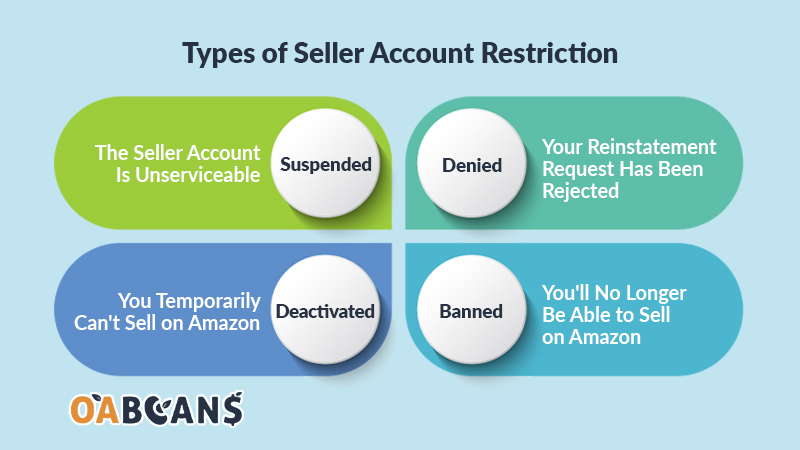
Sellers and older guides use several terms for account status:
- Suspended / deactivated: you cannot sell, but you can appeal with a Plan of Action. Amazon now mostly uses the term “deactivated”.
- Under review: Amazon is reviewing your appeal or documents.
- Denied: Amazon rejected your appeal. You can often submit a revised appeal that better addresses the issue.
- Banned (permanently deactivated): Amazon has made a final decision and will not reinstate the account. Opening a new account to get around this breaks Amazon’s rules.
Final Thoughts
An Amazon seller account suspension is one of the most worrying situations a seller can face, but it is often fixable. Read the notice carefully, find the real root cause, and submit one clear, specific Plan of Action through the Account Health dashboard. Then prevent the next one by watching your account health, sourcing carefully and following Amazon’s policies.
FAQs
How do I reopen my Amazon account after suspension?
Appeal the existing account. Amazon generally allows only one seller account per region unless you have a legitimate business need, so the right path is a Plan of Action through the Account Health dashboard, not a new account.
Can I create a new Amazon seller account after being banned?
Opening a new account to get around a deactivation breaks Amazon’s rules, and Amazon may link and deactivate the new account too. Focus on appealing the original account.
How long does an Amazon account suspension last?
There is no fixed length. The account stays deactivated until Amazon accepts your appeal. Response times vary from a few days to several weeks depending on the case, so submit a complete appeal as soon as you can.
How do I reinstate a suspended seller account on Amazon?
Find the exact reason in the notice and on your Account Health page, fix the problem, then submit a Plan of Action with root cause, corrective actions and preventive measures, plus any documents Amazon requested. If the appeal is denied, you can usually revise and resubmit it.
Does Amazon permanently suspend accounts?
Yes. Repeated policy violations, fraud, serious IP or authenticity issues, or ignoring Amazon’s requests can lead to a permanent deactivation that Amazon will not reverse.
What is the difference between suspended and deactivated?
Amazon now mostly uses “deactivated” for accounts that have lost selling privileges. A deactivated account can usually still be appealed unless Amazon says the decision is final. Read our article on Amazon account deactivated vs suspended for details.